
"Moving into a new home is a thrilling milestone. You change the deadbolts on your front door immediately—but what about your garage? The previous homeowners, delivery drivers, and contractors may still have wireless codes saved to the opener. Wiping the receiver memory and reprogramming your own accessories is a critical safety priority. Learn how to secure your new driveway."
Step 1: Wipe the Opener's Receiver Memory
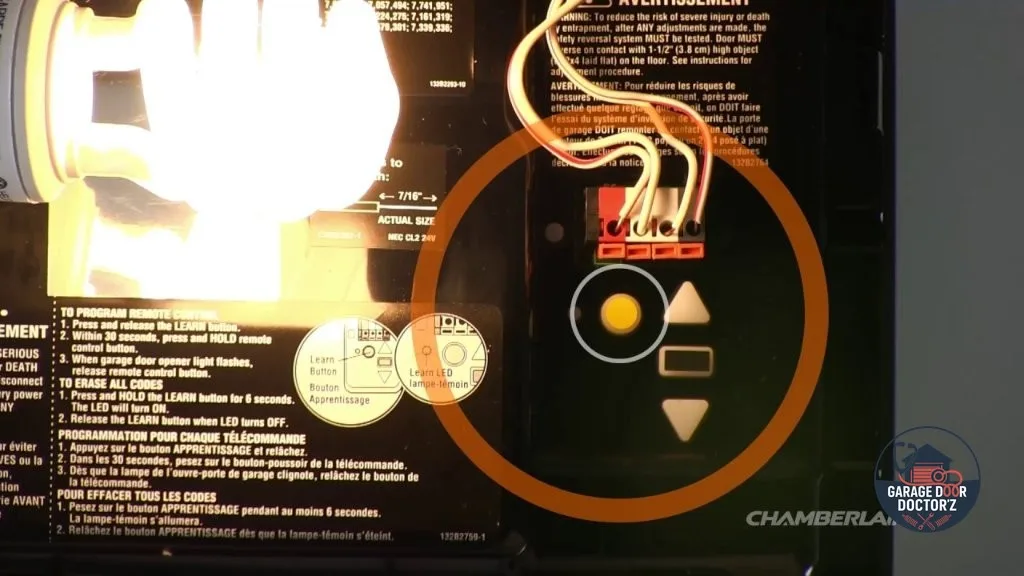
To guarantee that no lost remotes, old keypads, or smart apps can operate your door, you must clear the memory of your opener's logic board. Go to the opener motor unit mounted on your garage ceiling. Locate the "Learn" button (colored orange, purple, green, or yellow). Press and hold this button down for about 6 seconds. The indicator light next to the button will glow and then go out. This successfully erases all stored codes!
Step 2: Reprogram Your Visor Remotes
Now that the memory is empty, none of your remotes will work. To link your primary visor remote, press and release the "Learn" button once (do not hold it this time). The indicator light will glow steadily for 30 seconds. Within this window, press and hold the button on your hand-held remote control. Your opener's worklight bulb will flash once, or you will hear a mechanical click. Your remote is now programmed!
🚗 Built-in In-Car HomeLink Setup
If your vehicle has built-in HomeLink buttons on the visor or rearview mirror, hold the desired HomeLink button and your remote button together until the car light flashes rapidly. Then press the opener's "Learn" button and tap the HomeLink button twice to synchronize the rolling code!
Step 3: Program the Wireless Exterior Keypad
To set up your exterior keypad mounted on your garage door jamb, press the "Learn" button on the motor. Within 30 seconds, enter your new 4-digit PIN on the keypad, then press and hold the "Enter" button until the opener lights blink. Your numeric code is now active and stored securely.
Step 4: Configure Smart App Connections (myQ Setup)
If your LiftMaster or Chamberlain opener features smart app compatibility, download the myQ app on your smartphone. Follow the in-app pairing wizard. It will prompt you to connect to the opener's local Wi-Fi signal, select your home router, enter your password, and register the unit to your account. This wipes out any previous homeowner's cloud access, securing your internet boundary.